Systems built from inside the operation.

Working across search, content, data products, traffic, calls, reporting, training, automation, and public tools creates a different kind of product brief.

These examples show how operating experience becomes a useful product. Live, prototype, and illustrative work is labeled plainly.

Live public website

USA Stocked Fish

A national fishing directory that connects state stocking sources, species, local destinations, and practical planning tools in one searchable resource.

Visit USA Stocked Fish
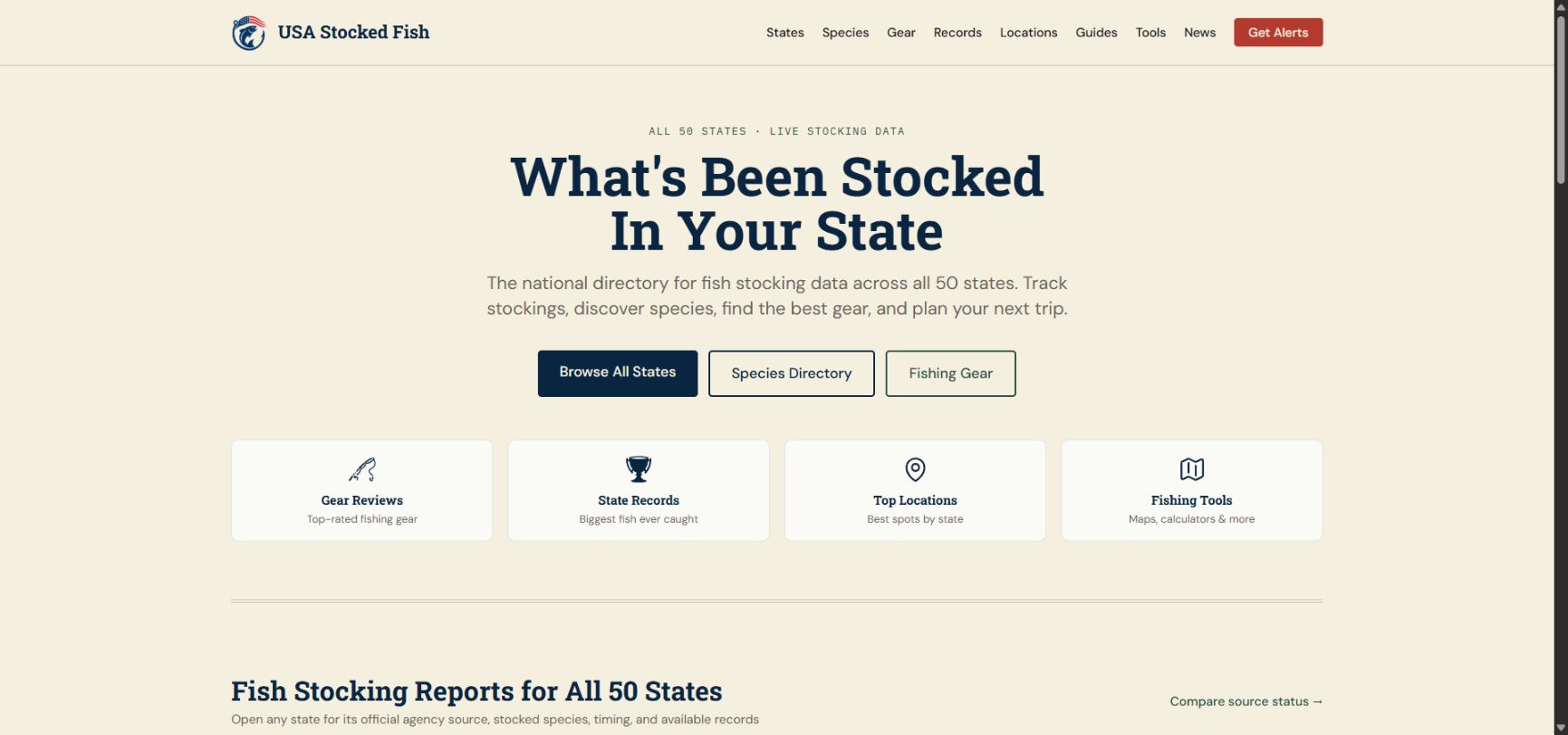
USA Stocked Fish homepage with state directory and fishing planning tools
Public homepage captured September 15, 2026. The directory connects all 50 states to their own source context. View full size

The work behind it

Fish stocking information is spread across state agencies, report formats, and local guides. Finding the right source is only the first step in planning a trip.

The directory covers all 50 states while distinguishing official source links from available stocking records. State, species, location, and guide pages give readers useful routes through the information.

  1. 1

    Find the source

    Organize official agency resources by state and make source status visible.

  2. 2

    Connect the context

    Link stocking information to species, locations, and fishing guides.

  3. 3

    Plan the trip

    Provide maps, fishing calendars, and focused tools alongside the content.

Work included
Web design and development · Data pipelines · Content architecture · Technical SEO · Interactive tools · Ongoing maintenance
Project status
A live national directory with state-specific source context. Data availability and refresh schedules vary by agency.
LIVE SINCE 2023

Utah Stocked Fish: a search-led resource built to compound.

A long-running Utah fishing property that turns official stocking data into practical tools, local water guides, species pages, seasonal content, and a growing search footprint.

Explore Utah Stocked Fish
BUILT AND OPERATED
Since 2023
PUBLIC CONTENT FOOTPRINT
325 URLs across four sitemaps
LIVE DATA SNAPSHOT
1,743 current-year stocking rows

Public snapshot checked August 10, 2026. Content count comes from thelive XML sitemap index; stocking rows come from the live Quick Reports view.

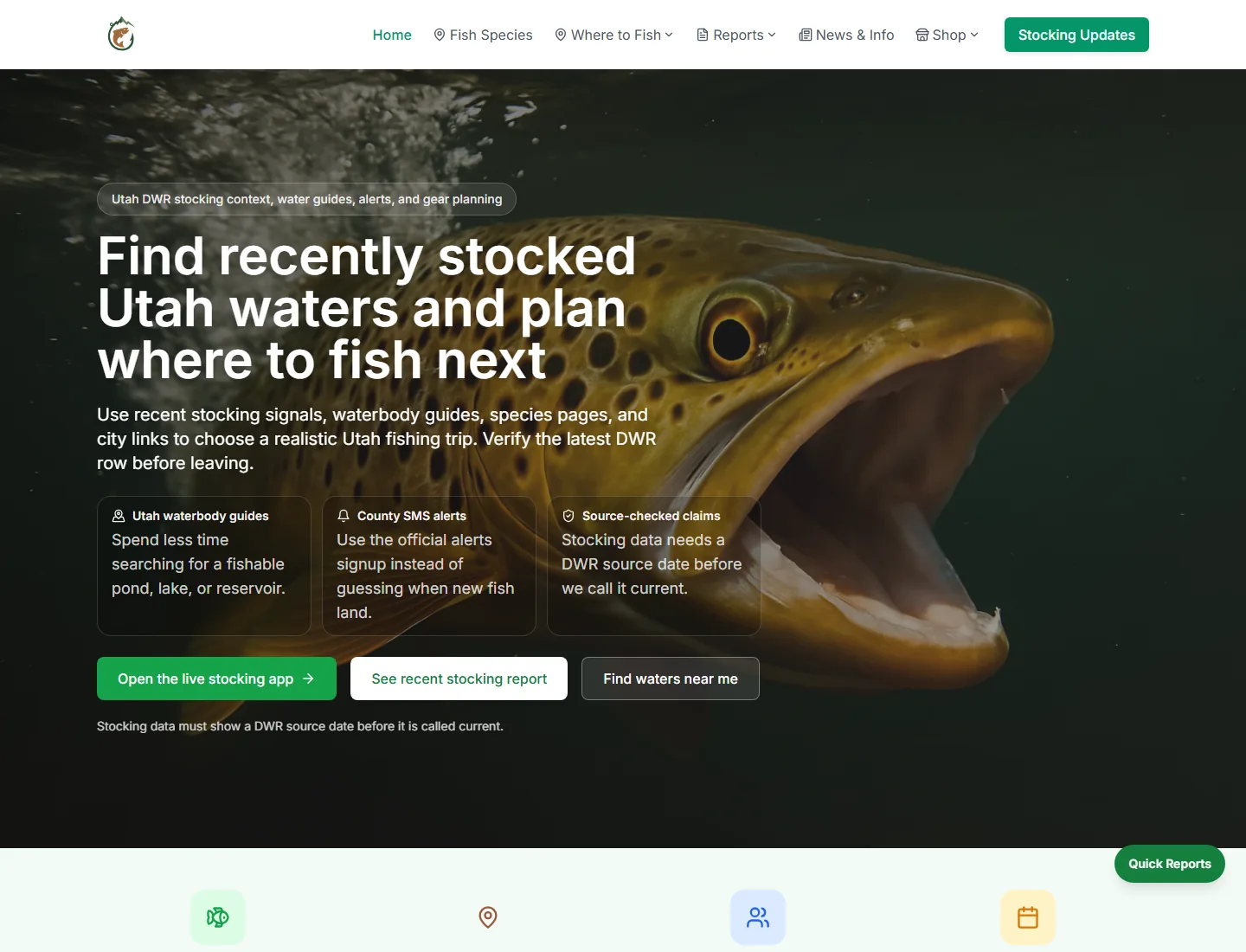
Utah Stocked Fish homepage with a brown trout, recently stocked water planning tools, and links to the live stocking app
RESOURCE HUBThe homepage routes anglers from a current stocking signal into water guides, official alerts, and the next practical planning step.View full size
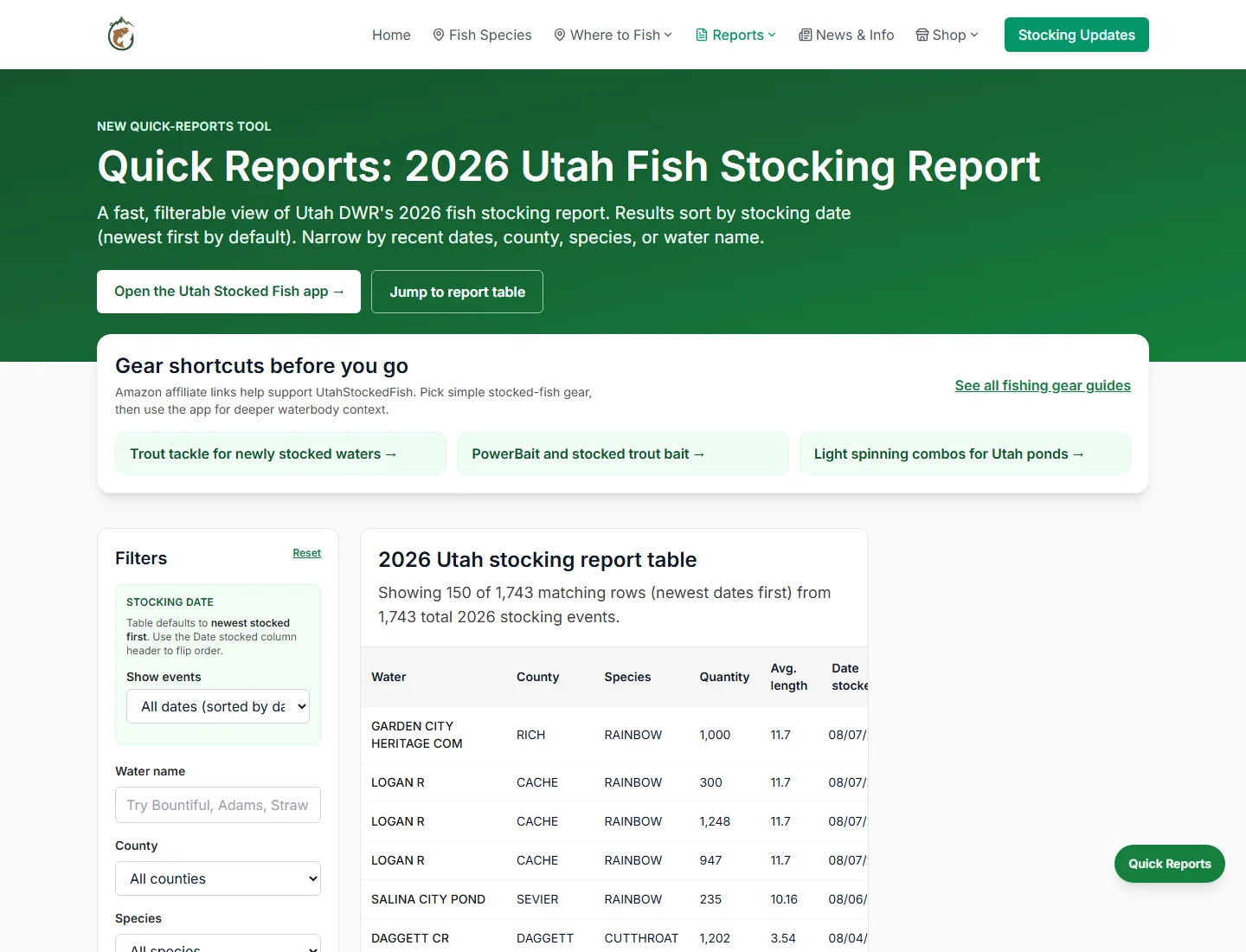
Utah Stocked Fish Quick Reports page with date, water, county, and species filters beside the 2026 stocking table
LIVE REPORTING TOOL

A filterable interface turns current DWR rows into a faster county, species, water, and date lookup.View full size

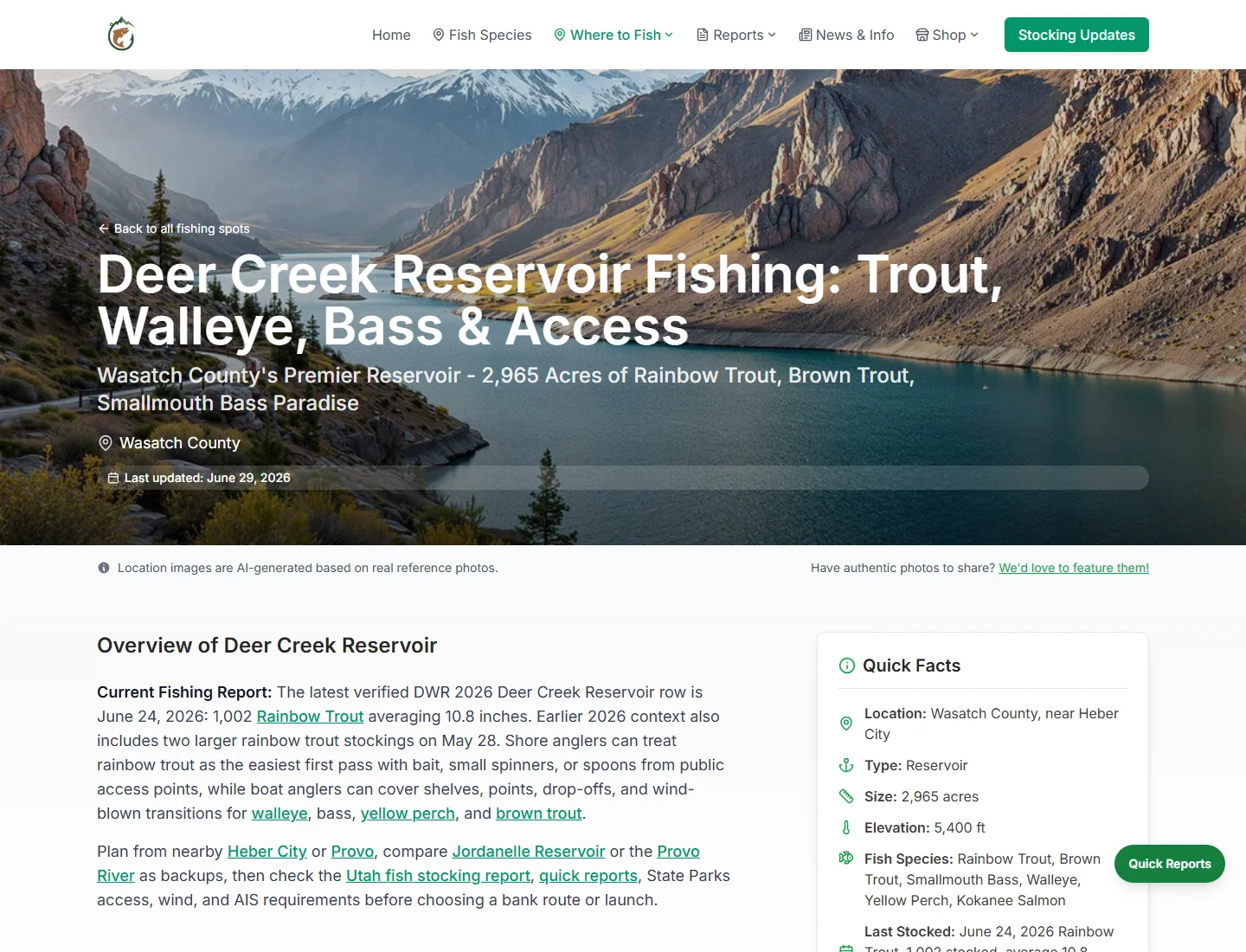
Deer Creek Reservoir guide combining current stocking context, access notes, nearby alternatives, and species links
LOCAL SEARCH PAGE

Each water guide answers a location-specific search while connecting fresh data, access, species, and backup-trip options.View full size

A useful answer became a durable audience asset.

An official stocking row can say what was planted and when, but a useful fishing plan still needs access context, likely species, current rules, realistic tactics, and a nearby backup water.

Built and operated since 2023, the site combines DWR-sourced stocking context with locally specific planning pages, interactive reporting, editorial updates, and practical gear paths.

  1. 1

    Find the question

    Use real angler searches to identify the next trip-planning decision that still takes too much work.

  2. 2

    Build the useful answer

    Turn stocking data and local context into a focused tool, guide, report, or directory page.

  3. 3

    Connect the next step

    Link stocking activity to waters, species, city pages, regulations, and relevant gear without breaking the planning flow.

  4. 4

    Refresh the evidence

    Keep source dates, seasonal pages, current-year reports, and internal links maintained as conditions change.

Marketing and SEO are part of the product.

Utah Stocked Fish began with a narrow, durable question: what was stocked, where was it stocked, and what should an angler do next? The project has stayed live since 2023 because the answer is maintained as an operating system rather than published once as a campaign.

Fast, current-data pages serve stocking-report demand. Evergreen waterbody, species, and city pages answer the decisions around a trip. Seasonal reports and news create timely entry points. Internal links then move a visitor from a stocking row to access context, likely species, regulations, nearby alternatives, and gear that fits the plan.

Source dates and links back to the Utah DWR stocking report are part of the content model. That makes freshness visible to readers and gives search engines a clearer set of focused pages than one broad fishing homepage could provide.

Public proof of sustained growth

On August 10, 2026, the public sitemaps listed 176 water guides, 44 species pages, 27 news articles, and 78 static or utility pages—325 URLs in total. The live Quick Reports tool showed 1,743 current-year stocking rows. The maintained footprint is the evidence presented here; private traffic and revenue are not estimated.

WORK INCLUDED
Product strategy, Web design and development, Technical SEO, Content architecture, Data tooling, Affiliate marketing, Ongoing operations.
OPERATING OUTCOME
A maintained search-and-product ecosystem with public proof across tools, local guides, seasonal updates, and hundreds of focused pages.

Local business · Storefront in preview

Bejeweled Besties

Helping a small Eagle Mountain, Utah business build its digital presence, from a recognizable storefront to an interactive studio for custom hats and bags.

Visit Bejeweled Besties
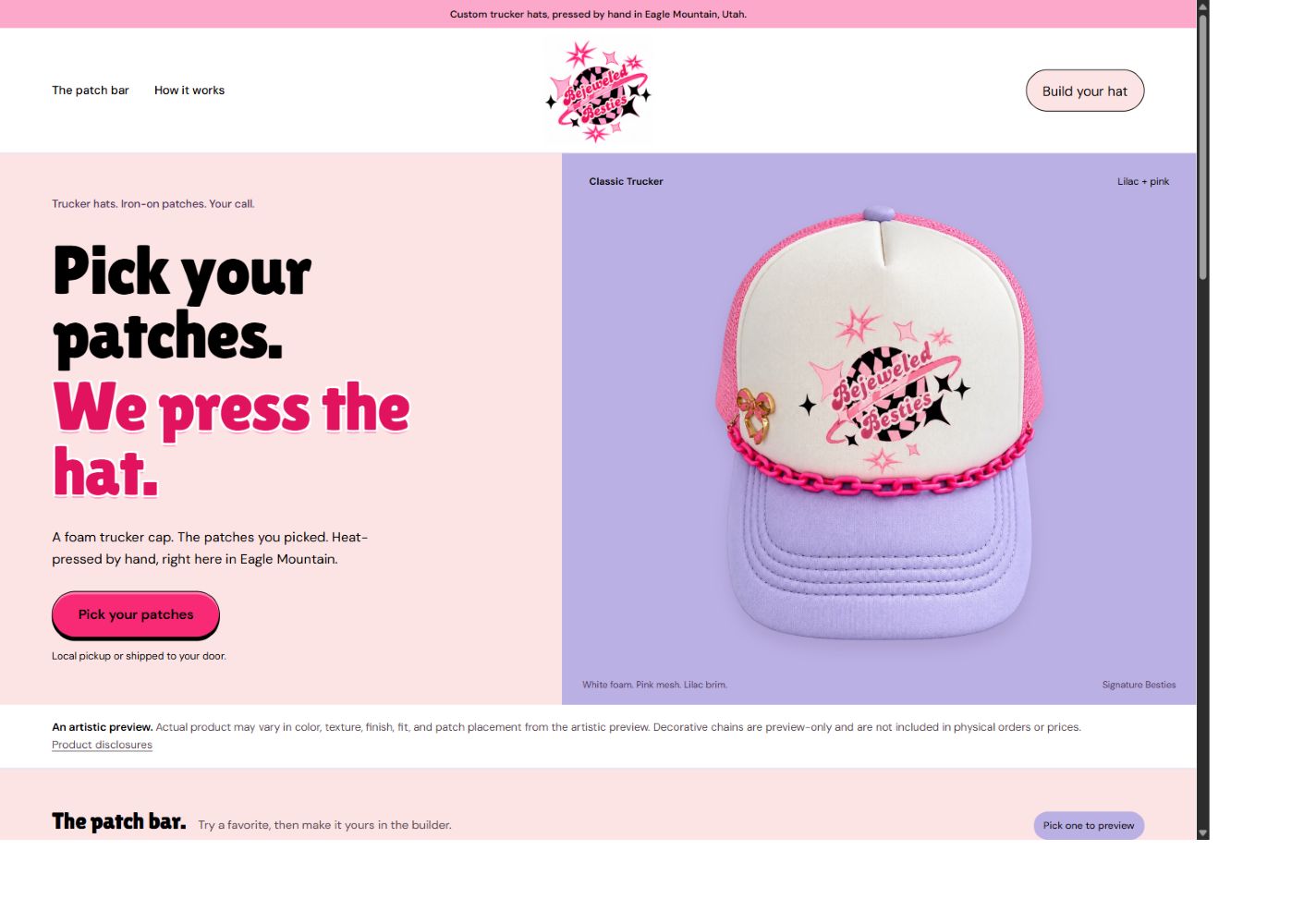
Bejeweled Besties storefront preview with custom hat branding
Storefront preview for a small local business. The public domain currently shows a coming-soon page. View full size
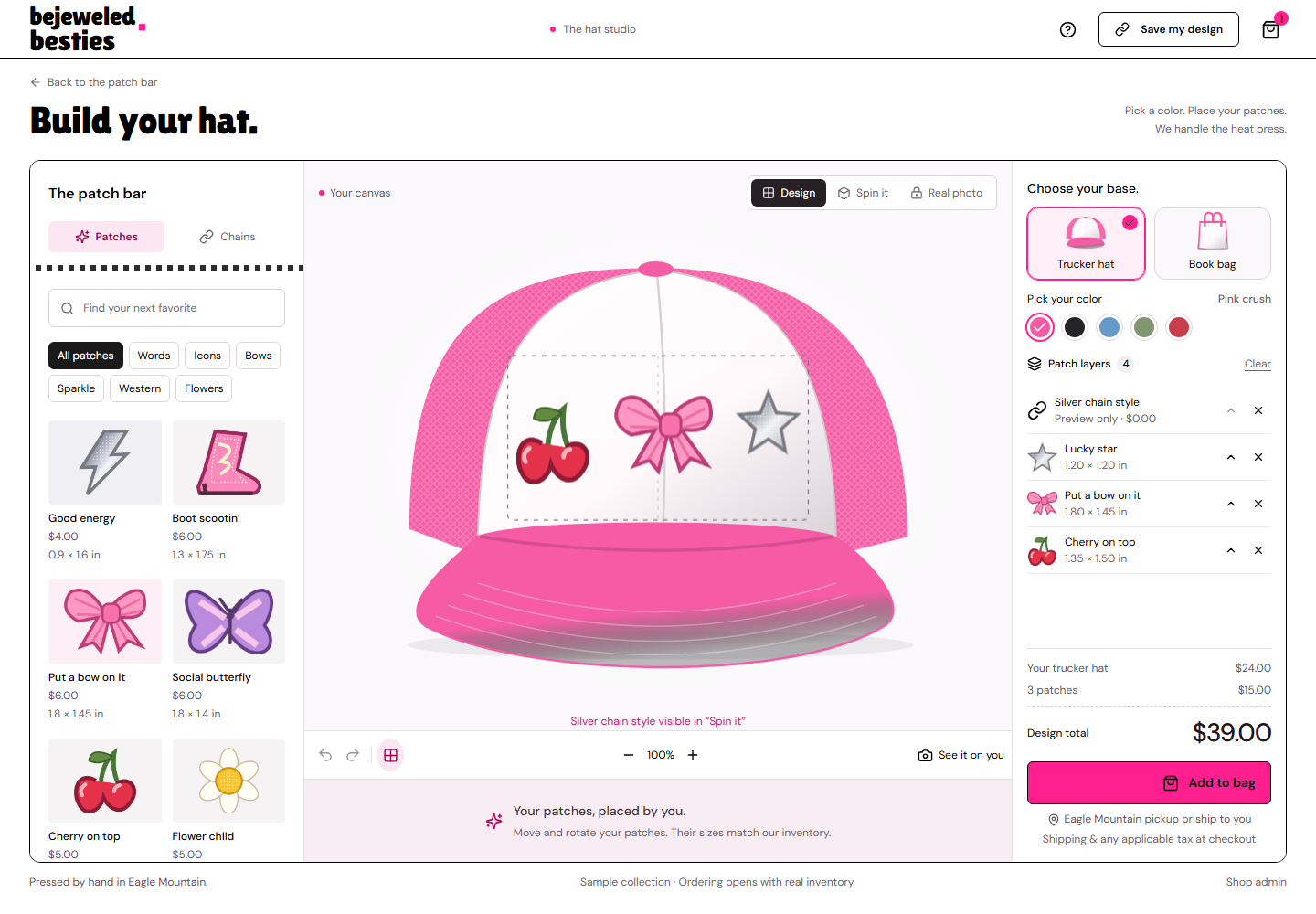
Bejeweled Besties hat studio with patch selection and physical placement controls
Development screenshot of the product designer using sample patches and prices. Ordering opens after inventory and commerce setup. View full size

The work behind it

A hands-on, custom product needs an online experience that communicates the brand and helps customers explain exactly what they want made.

The work brings together brand presentation, mobile-friendly pages, patch selection, product previews, saved designs, and a path from customer design to a placement sheet for production.

  1. 1

    Meet the business

    Introduce the local makers, their products, and the customization process.

  2. 2

    Make it personal

    Choose a base and arrange patches with physical dimensions and preview controls.

  3. 3

    Prepare the handoff

    Carry the saved design into an order workflow and actual-size placement PDF.

Work included
Digital presence · Brand presentation · Website development · Product configurator · Mobile UX · Commerce workflow
Project status
A working storefront preview and design studio. Public launch and ordering depend on final inventory and commerce setup.

LIVE PUBLIC TOOL

Pick QR Code: a free QR code generator for business.

A free QR code generator built for small businesses that need a usable code without an account, a watermark, or a software detour.

Make a free QR code
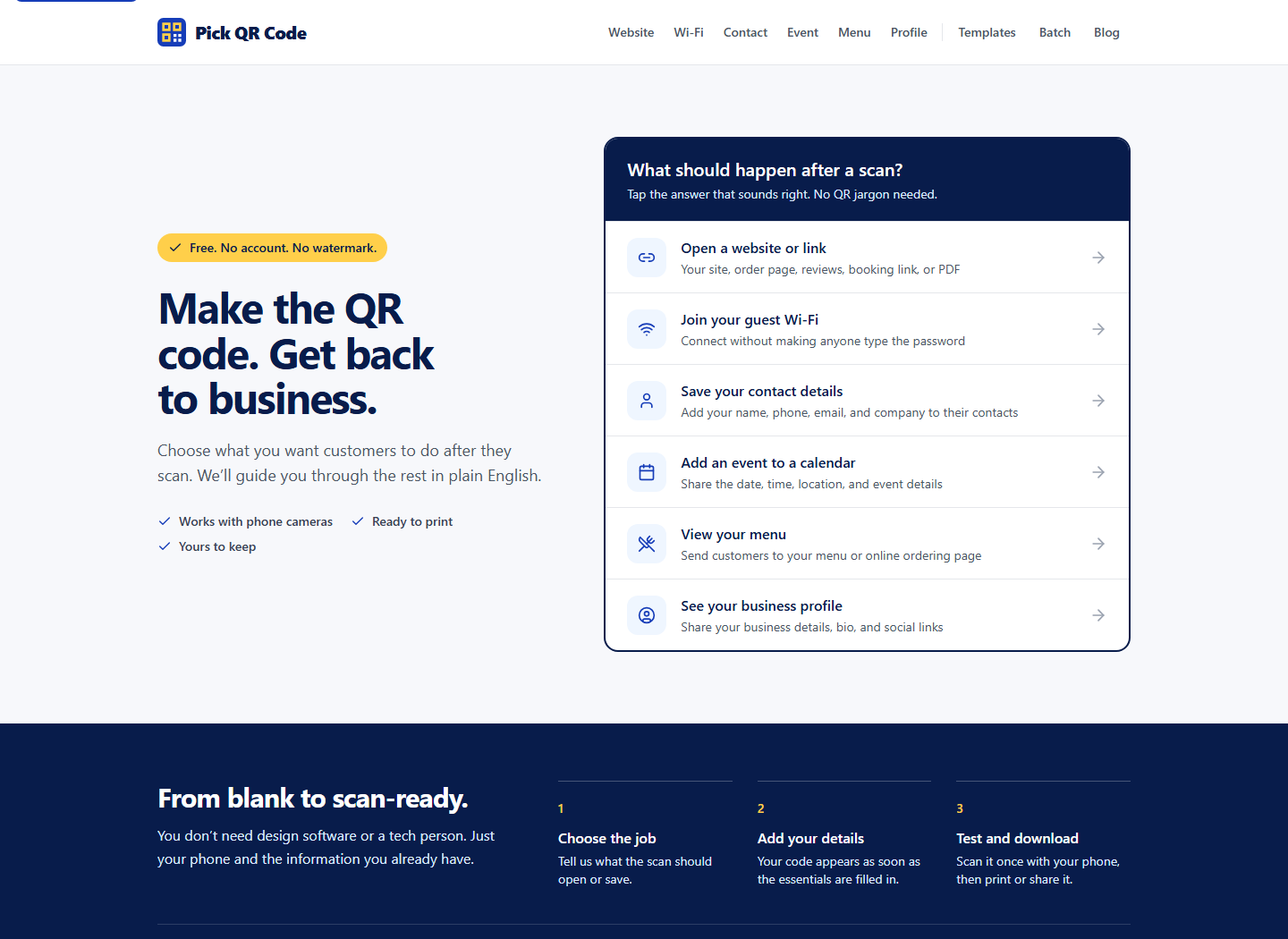
Pick QR Code homepage showing six plain-language QR code jobs for websites, Wi-Fi, contacts, events, menus, and business profiles
TASK PICKERThe first screen asks what should happen after a scan, using the language of the job instead of QR payload types.View full size
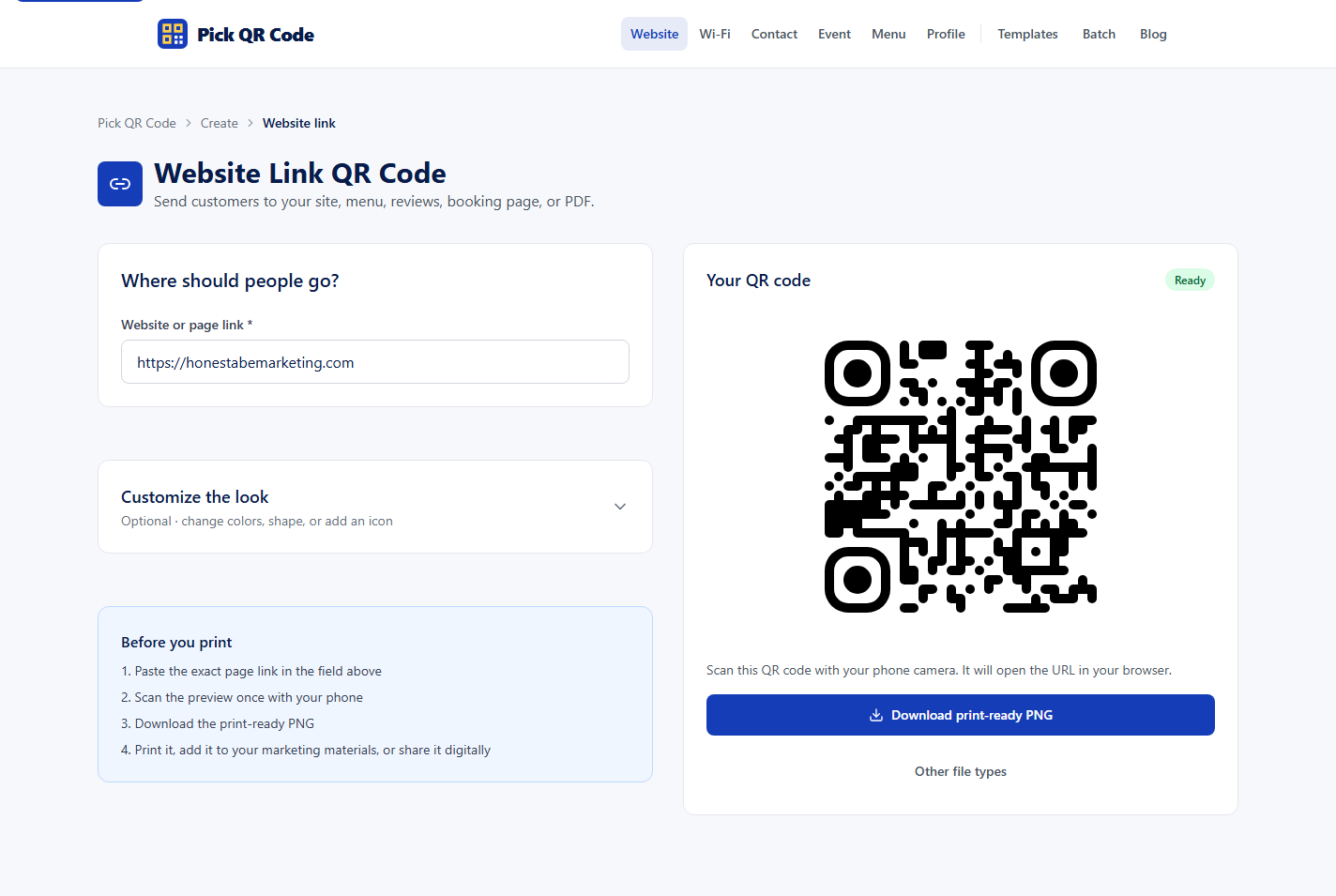
Pick QR Code website generator showing the Honest Abe Marketing URL, a live QR preview, print guidance, and a PNG download
LIVE GENERATOREntering a destination creates the preview immediately, with testing instructions beside the print-ready download.View full size

Start with the job, not the QR jargon.

Most people do not begin with QR terminology. They begin with a job: open a review page, share guest Wi-Fi, save contact details, add an event, show a menu, or introduce a business.

The product turns those familiar jobs into guided generators with live feedback, practical customization, scan-testing guidance, and print-ready downloads.

  1. 1

    Choose the job

    Start with what the customer should open or save after scanning.

  2. 2

    Add the details

    Enter the link, network, contact, event, menu, or profile information.

  3. 3

    Test and download

    Scan the live preview, then export a PNG or SVG for print or digital use.

A short path from idea to something you can print.

A business owner rarely starts by asking for a URL payload or a vCard. They want a customer to open a booking page, join guest Wi-Fi, save a phone number, add an event, view a menu, or find the right profile. Pick QR Code makes that intent the first decision.

Each guided generator asks only for the information that job needs. The QR preview updates while you work, and the optional controls let you adjust color, shape, icon or logo, and scan reliability without turning the page into design software.

The final step stays practical: scan the preview with a phone, confirm the destination, and download a PNG or SVG. There is no account required and no watermark added to the code.

One decision to make before printing

The free generators create a static, fixed-destination code from the details entered. If the destination may change after signs, cards, or packaging are printed, point the code to a stable page or redirect you control. Either way, test the finished code at its real print size before ordering a full run.

WORK INCLUDED
Product strategy, UX writing, Interface design, QR generation, SEO architecture, Deployment.
SHIPPED OUTCOME
A live, no-account utility that moves from business intent to a tested, downloadable QR code.

WORKING PROTOTYPE

T-NAT / Training Needs Analyzer

An AI-assisted training platform that turns organizational evidence into a needs diagnosis, an instructional blueprint, and reviewable course material, with explicit quality checks at each stage.

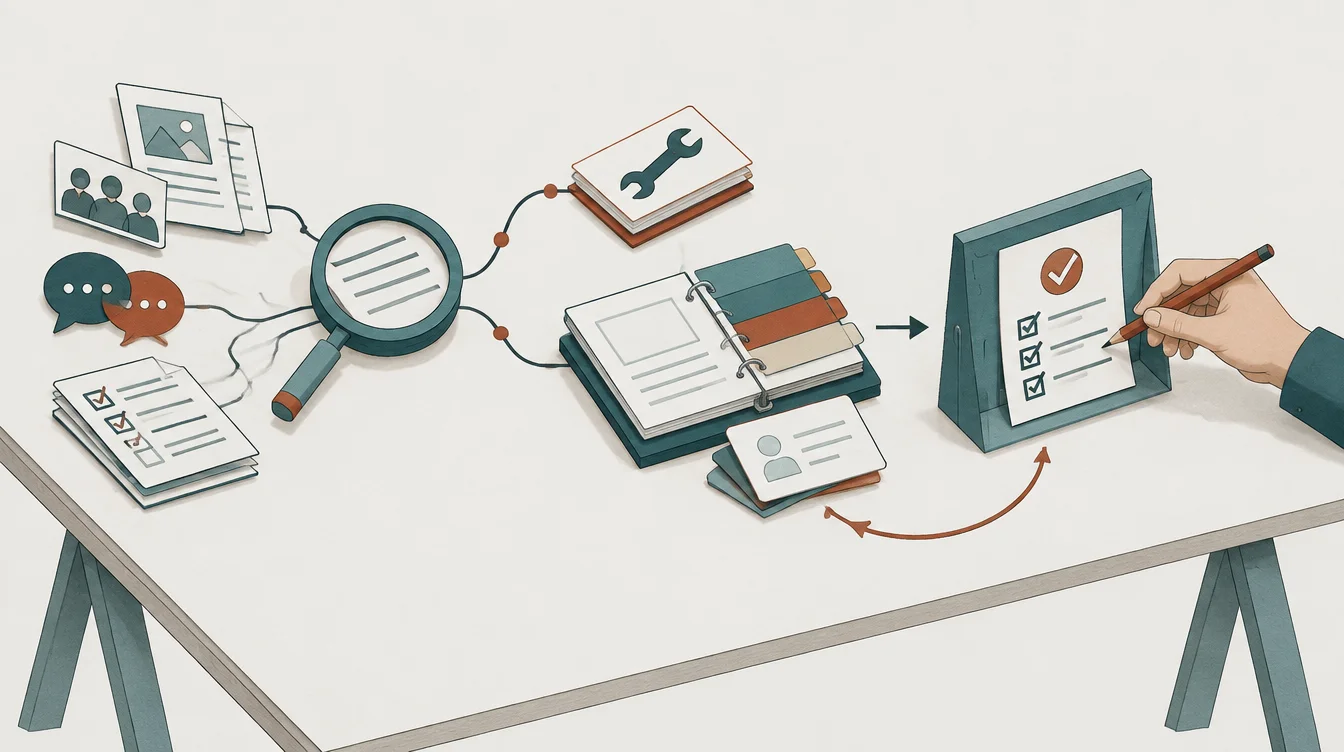
Evidence passes through analysis, branches into operational fixes or learning material, and reaches a human quality review with a revision loop.

Understand the gap before building the course.

  1. Find the causeResearch, conversations, and surveys inform the diagnosis. Some gaps need a process fix.
  2. Shape the learningTrainable gaps become objectives, practice activities, assessments, and supporting material.
  3. Check and reviseQuality checks identify weak sections. A person reviews the resulting plan.

AI-generated conceptual illustration. The actual app views and implemented scoring model follow below.

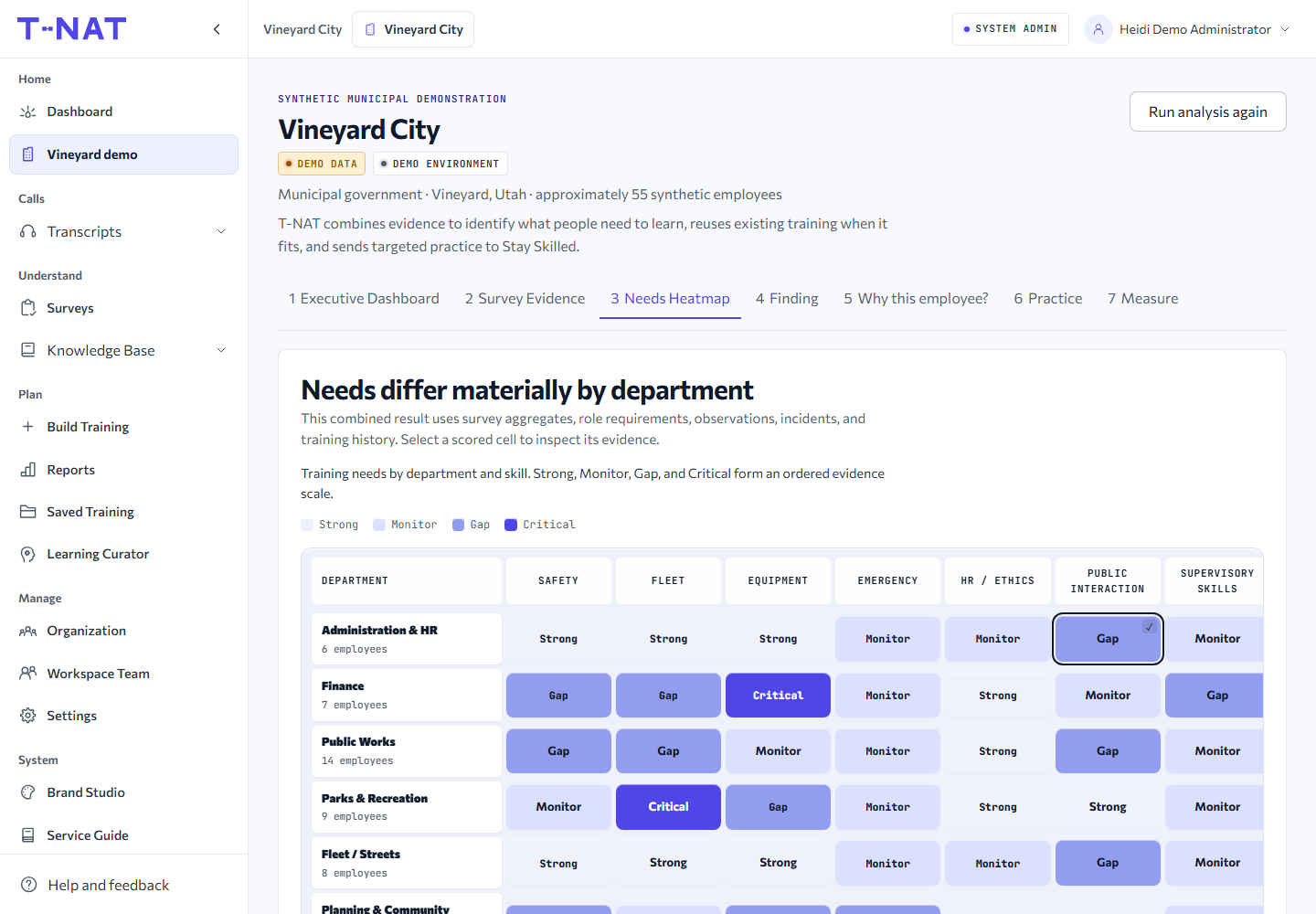
T-NAT synthetic municipal demo showing training needs by department and skill
Actual in-app QA capture with synthetic municipal data. Vineyard City is a demonstration scenario, not a client claim or employee assessment. View full size
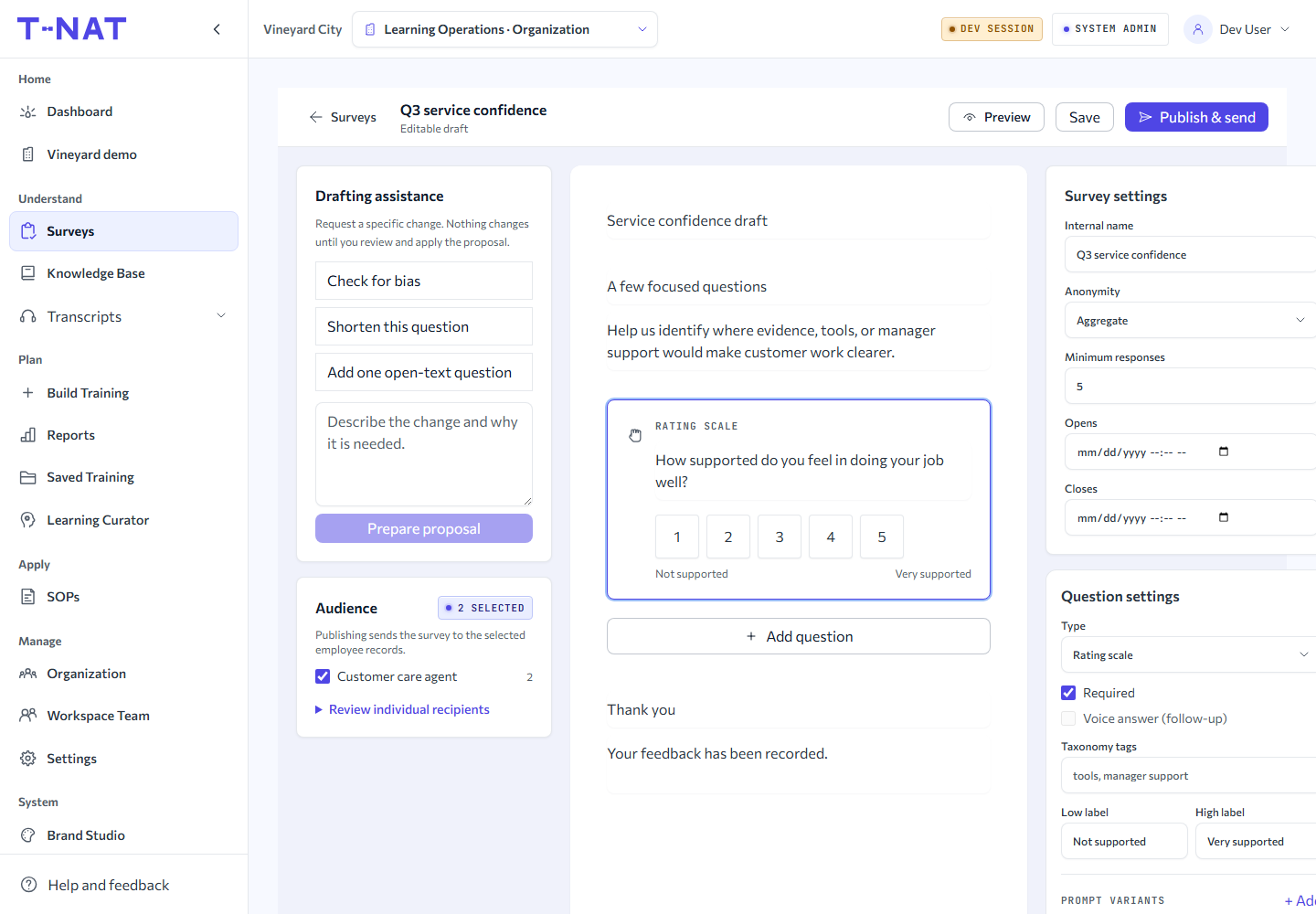
T-NAT survey builder with drafting assistance, question controls, and audience settings
Actual survey-builder UI using test fixtures. Drafting assistance proposes changes for review before they are applied. View full size

INSIDE THE AI HARNESS

From a training request
to a defensible learning plan.

The harness coordinates analysis, research, drafting, and review. Each stage leaves an inspectable artifact, so a reviewer can trace how the recommendation was reached.

  1. INTAKE + NEEDS PROFILE

    Frame the need

    Normalize the audience, role, business goal, delivery format, and time available. Surface missing information before it becomes a confident recommendation.

    Output Structured brief and prioritized gaps

  2. RESEARCH + DIAGNOSIS

    Ground the analysis

    Combine cited research with selected company sources. Separate trainable skills from process, tooling, environment, and motivation problems.

    Output Evidence, root causes, and non-training actions

  3. THEORY + BLUEPRINT

    Design the intervention

    Use a curated instructional-design knowledge base to connect learning objectives, activities, assessments, and delivery constraints. Consider coaching and job aids alongside courses.

    Output Module sequence and assessment blueprint

  4. AUTHORING + RESOURCES

    Draft useful material

    Author sections from the agreed structure and supporting evidence. Assist with activities and assessment plans, then connect saved courses and resources to a reviewable roadmap.

    Output Training drafts and supporting resources

QUALITY GATE / 100 POSSIBLE POINTS

Score the draft.
Repair what fails.

Deterministic checks evaluate the report against its brief. An additional AI judge can inspect ambiguous or high-risk results for coherence and domain specificity.

These are configured report-quality weights, not sample results or employee proficiency scores.

Self-service threshold
80/100
Managed threshold
90/100
  • Feasibility20 pts
  • Objective / assessment alignment20 pts
  • Authored content coverage15 pts
  • Citation grounding15 pts
  • Required sections10 pts
  • Time budget10 pts
  • Specificity of language10 pts

A high total cannot override critical failures in feasibility, objective-to-assessment alignment, or authored coverage.

TARGETED REVISION → RECHECK → HUMAN REVIEW

Failed checks identify sections to repair. The engine preserves a version snapshot, allows up to two fix cycles, and runs QA again. Managed workflows add an administrator review before approval.

What makes the analysis traceable?

Schema-validated stage outputs, source references, versioned artifacts, run events, and scoped reruns keep the analysis inspectable. Durable background jobs coordinate longer runs and section authoring. Company-scoped sources constrain the evidence available to each run.

Workflow illustration based on the working prototype. Scoring configuration verified against the implementation in September 2026.

The operating problem

A request for training can hide a process problem, a tooling limitation, or an unclear expectation. Producing more course content only helps when the diagnosis and the learning objectives are sound.

The analysis harness brings together structured intake, company knowledge, cited research, instructional-design guidance, and versioned outputs. Surveys and needs heatmaps help reviewers see where to focus.

WORK INCLUDED
Product direction, AI harness design, Evidence analysis, Quality scoring, Course-material assistance, Survey and training UX.
INTENDED OUTCOME
A traceable path from business need to reviewed training recommendations and supporting material.

From evidence to focused training.

The survey builder brings question design, audience selection, and drafting assistance into one workspace. The needs heatmap connects skill gaps to departments so a reviewer can inspect the evidence behind a training priority.

Course-material assistance builds on that diagnosis: module sequencing, objective-aligned activities, assessment plans, and section drafts. Learning Curator adds saved course resources and review statuses to the training roadmap, while Saved Training keeps reusable material organized. People review the proposed content and resources before adopting them.

Configured company workflow · Operator reviewed

Paperclip AI · Building a fishing media company

Structuring an AI-assisted company inside Paperclip: defined roles, project ownership, research handoffs, implementation, and quality review across a network of fishing websites.

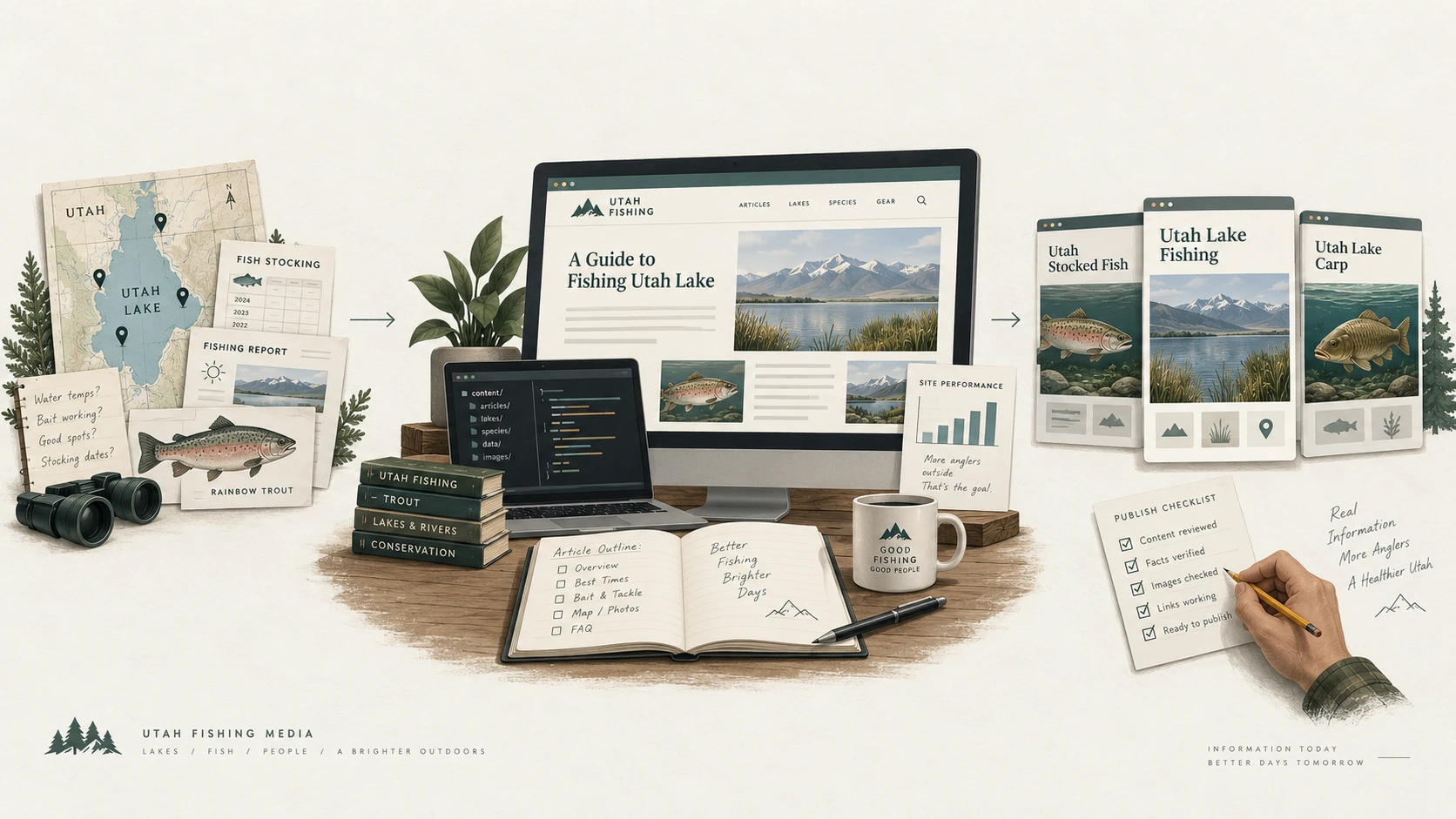
Utah Lake maps, stocking records, and fishing reports inform content and website development for Utah Stocked Fish, Utah Lake Fishing, and Utah Lake Carp, followed by a human publishing review.

One fishing network. Clear ownership at every handoff.

  1. Source the useful questionStocking records, local conditions, and angler searches become an evidence-backed brief.
  2. Coordinate the specialistsResearch, content, engineering, and QA work from scoped assignments inside the company.
  3. Review the resultAn operator reviews publication decisions; site and audience feedback guide the next assignment.

Conceptual illustration of the fishing media workflow. Website layouts and the performance chart are illustrative, not live screens or measured results. Actual Paperclip company views are available below.

See the actual Paperclip company workspace
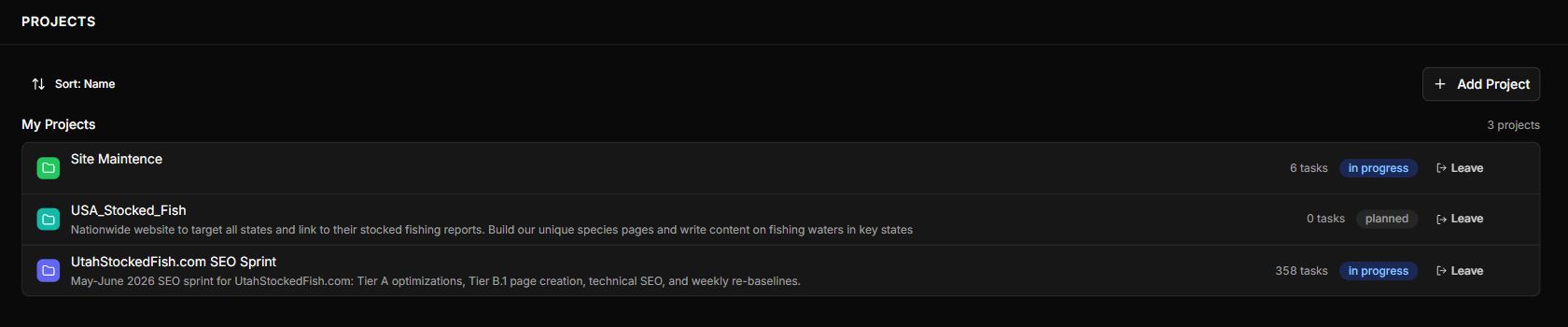
Actual Paperclip fishing company projects, including USA Stocked Fish and the Utah Stocked Fish SEO sprint
Company project overview in Paperclip: national expansion, a Utah SEO sprint, and site maintenance. Project status labels describe the board, not active agent runs. View full size
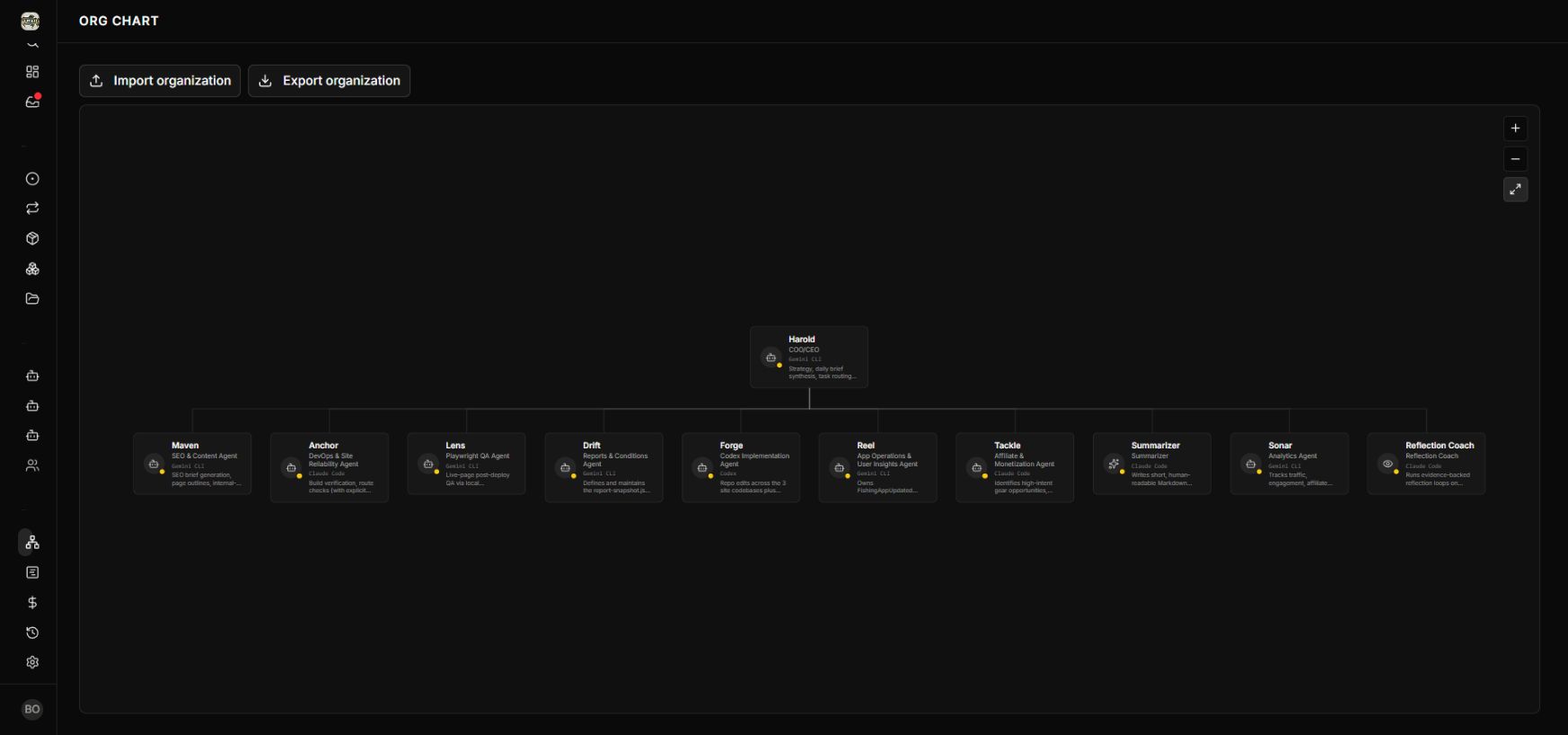
Actual Paperclip organization chart for Utah Fishing Media, with leadership and specialist roles
Actual Paperclip company workspace: Utah Fishing Media. The chart shows configured responsibilities across the fishing network; task contents and spending are outside the capture. View full size

The work behind it

Running related fishing properties means coordinating fresh source data, useful local content, site maintenance, and audience feedback. Each handoff needs an owner and a clear definition of done.

Utah Fishing Media connects Utah Stocked Fish, Utah Lake Fishing, and Utah Lake Carp. Specialist roles cover conditions research, SEO, engineering, browser QA, site reliability, monetization, app operations, and analytics. Paperclip supplies the company workspace; our work is designing and configuring how the company operates.

  1. 1

    Research and brief

    Conditions research and SEO roles turn source evidence and angler questions into scoped assignments.

  2. 2

    Build and verify

    Engineering implements the assignment; QA and site reliability check pages, sources, mobile presentation, builds, and links.

  3. 3

    Review and improve

    An operator reviews publication decisions. Analytics and app feedback inform the next round of work.

Work included
Company design · Agent roles and instructions · Project coordination · Research-to-content workflows · QA gates · Self-hosted operations
Project status
A configured operating structure for a fishing media network. Runs are currently paused; the workspace illustrates organization and review, not unattended production activity.

In development · Expo Go preview

Fishing app · iOS in development

A fishing-focused mobile app being developed and explored in Expo Go, extending the portfolio into the iPhone experience.

The work behind it

Fishing is a mobile activity. A dedicated app creates room to explore how the experience should work on a phone.

An active development project, with an Expo Go build under review. Screens and feature details will be added from the verified fishing build.

  1. 1

    Shape the experience

    Develop the fishing-focused mobile product.

  2. 2

    Preview on device

    Review the development build through Expo Go.

  3. 3

    Refine the app

    Use device feedback to guide the next iteration before release.

Work included
Mobile product development · Expo Go prototyping · iOS experience
Project status
An iOS development project. App Store availability is not claimed.

SANITIZED OPERATING MODEL

Lead operations system

A connected view of source, consent, routing, call review, reporting, and the human decisions that determine what is worth scaling.

Sanitized operating modelOne visible quality loopIllustrative structure; no client data or performance claims.
  1. 01

    Source

    Campaign, partner, consent, and service intent

  2. 02

    Route

    Destination, context, timing, and fallback

  3. 03

    Review

    Original record, call outcome, and quality signals

  4. 04

    Report

    Cost, qualification, disposition, and booked work

  5. 05

    Decide

    Fix, protect, pause, or scale with a human owner

The operating problem

Traffic, phone systems, affiliate feedback, and booked-work reporting often live in separate tools with no dependable quality loop.

Based on practical work across affiliate programs, call centers, home-service lead generation, tracking, reporting, websites, and automation.

A maintainable operating view with explicit human review points.

The stack behind the work.

Hands-on experience across the application, automation, and infrastructure layers. Tools are selected around the job and maintained after launch.

Web & mobile

TypeScript, JavaScript, React, Next.js, Astro, React Native, Expo, Python

Public websites, focused tools, and mobile applications.

Databases & backend

Supabase, Neon, Convex, PostgreSQL, Cloudflare D1, R2, Durable Objects

Application data, authentication, realtime workflows, and file storage.

Automation & integrations

Trigger.dev, Zapier, n8n, Paperclip, REST APIs, webhooks

Background jobs, connected systems, and reviewable task handoffs.

AI & development tools

OpenAI / Codex, Anthropic / Claude, Google / Gemini, xAI / Grok

Model-assisted development, research, analysis, and workflow integration.

Infrastructure & operations

Docker, self-hosting, Linux servers, Cloudflare, Git, GitHub

Self-maintained servers, containers, deployment, monitoring, and ongoing upkeep.

Payments & communication

Stripe, Clerk, Resend

Billing, identity, and transactional communication connected to the product.

Have an operating problem that deserves a better system?

Bring the workflow, the evidence it produces, and the decision that is still too hard to make.